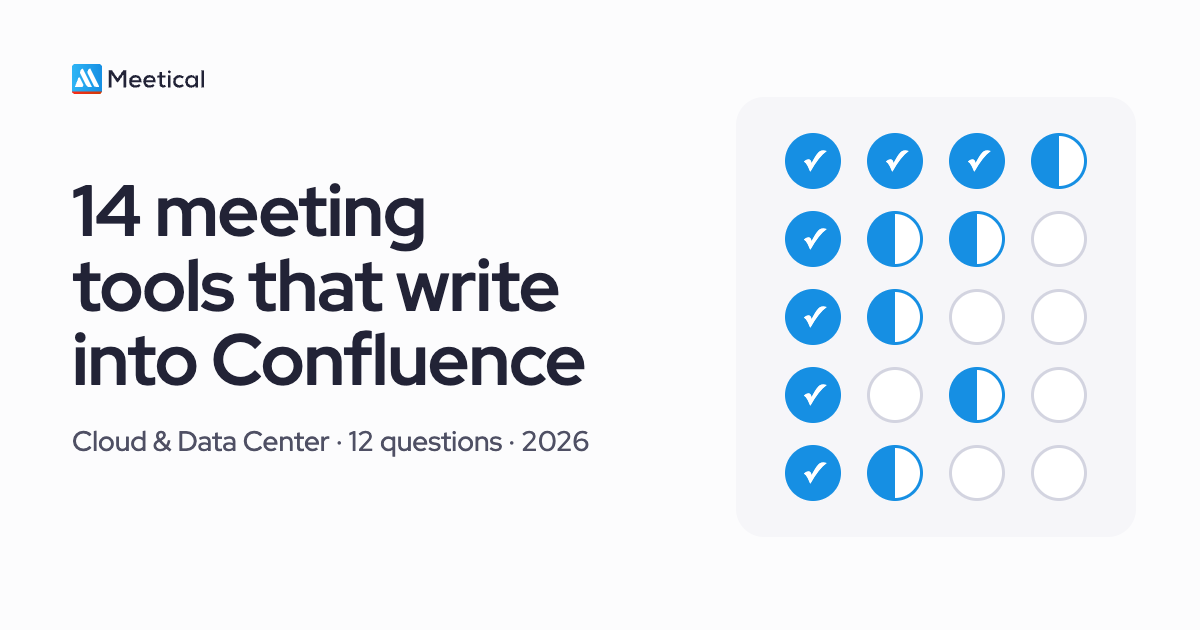

At Atlassian TEAM Europe 2026 in Amsterdam, I talked with many partners and customers about meeting notes. One question kept coming up: which meeting tools actually "work with Confluence" or "integrate with Confluence", and what does that even mean? Nobody had a clear picture. The short version: it depends on what you mean by works. A tool that drops a summary into a space after the call is a very different thing from one that has the page ready, from your template, before anyone joins.
So I did the research and tested every tool a buyer could plausibly use to get meetings into Confluence: 14 of them, against the same 12 questions, using each vendor's own documentation. Full disclosure: I build one of them, Meetical. That is why every row links to the vendor's docs as proof, and why I say plainly where Meetical loses.
The short answer
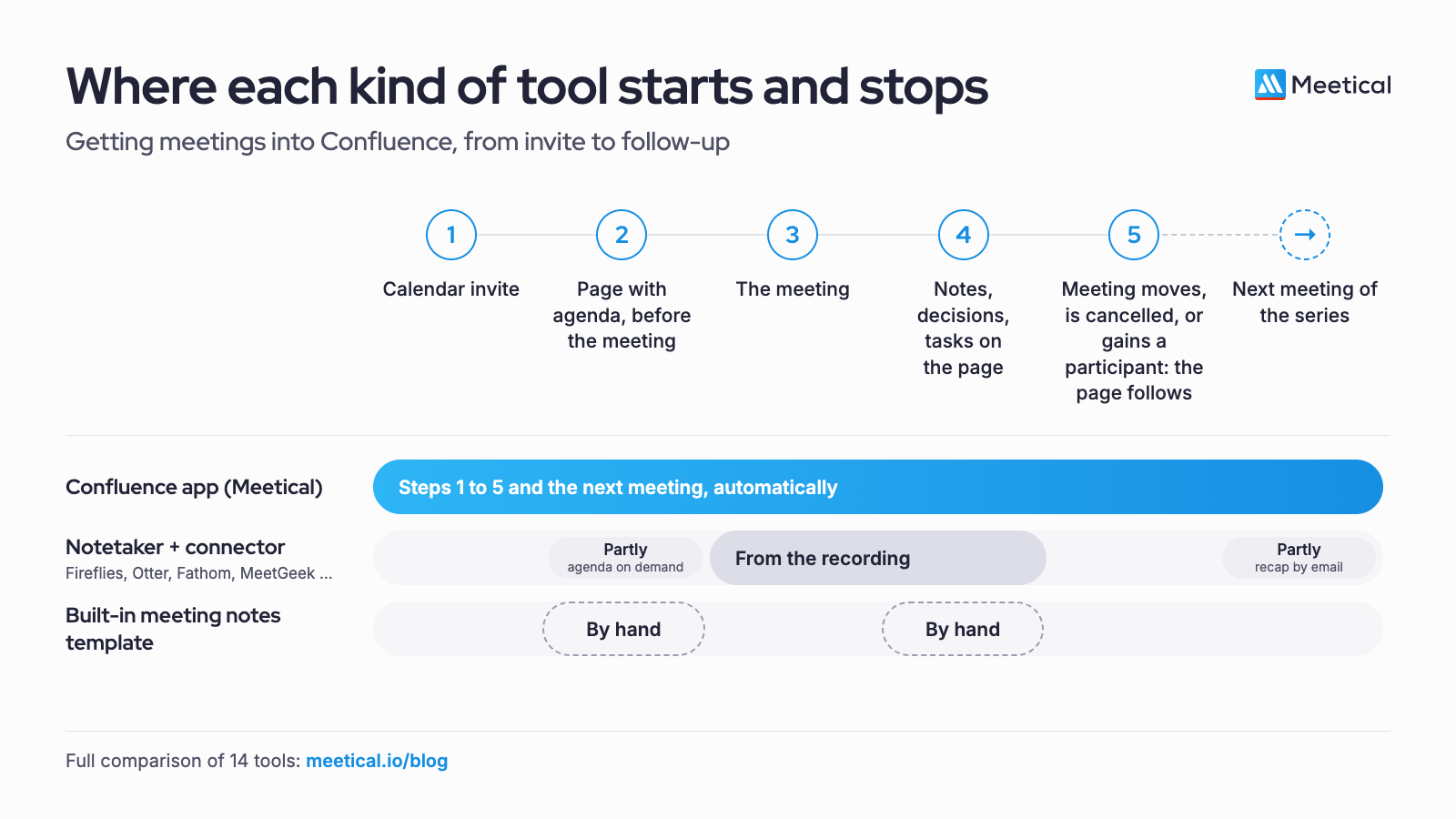
If you need the Confluence page to exist before the meeting, created from the calendar event in your own template and kept in sync when the meeting moves, you need a Confluence-native calendar app. In this test only Meetical does all of that, for Google Calendar and Microsoft 365. If you only need a summary filed into Confluence after the call, Fireflies and MeetGeek do it automatically, Read.ai and Fellow on a click, and Atlassian's own Loom AI meeting notes do it if you already pay for Loom Business+AI. If every action item must become a Jira issue automatically, Fireflies, MeetGeek and Fellow do that today; in Meetical they are Confluence tasks you turn into Jira work items when they need one. On Data Center, no notetaker works at all.
Download the comparison as a two-page PDF, made to forward to your team or IT.
What “integrates with Confluence” means
“Integrates with Confluence” covers everything from a one-time copy to a page that lives with the meeting. Here are nine levels, in the order a meeting runs through them, and who reaches each one.
| Level | Meetical | Loom AI meeting notes | Fireflies, MeetGeek | Read.ai, Fellow | Zapier, Make, own agent |
|---|---|---|---|---|---|
| Before and around the meeting | |||||
| 1. Agenda page before the call | ✓automatic, up to 31 days ahead, or on demand | ◐empty page on demand, one default space per user | ✗ | ✗(Fellow: agenda inside Fellow) | ◐one-time copy of the invite |
| 2. Linked in the calendar invite | ✓ | ✓ | not documented | not documented | ◐if you build it |
| 3. Your own agenda template | ✓per series | ✗Loom's layout | ✗ | ✗ | ◐page body in the zap or prompt |
| 4. Page follows the calendar | ✓moves, cancellations, new participants | ✗ | ✗ | ✗ | ✗ |
| 5. Event details kept up to date on the page | ✓date, time, location, status, attendees | ✗ | ✗ | ✗ | ✗ |
| After the meeting and the next one | |||||
| 6. Notes on that same page | ✓next to the agenda | ◐on Loom's page | ◐new page after each call | ◐on a click | needs a notetaker |
| 7. Your notes format | ✓two built-in formats, or your company's own, set up with our team | ◐four recap types | ◐the vendor's templates | ◐the vendor's templates | – |
| 8. Regenerate in another language or format | ✓within the retention window | ◐recap language and type selectable | ✓ | ✓Fellow both, Read.ai the template | – |
| 9. The series runs on its own | ✓next page created, open tasks of the series on every page, notetaker scheduled once | ◐parent page, last recap on request | ◐recap of the last meeting by email before the next | ◐recap before the next meeting; Fellow carries open items forward | ✗ |
Levels 1 to 5 decide whether the page is ready and right before anyone joins. Levels 6 to 9 decide whether the notes end up where the work continues.
How I tested
Each tool gets a yes, no or partial per column, with a one-line note on what the vendor's documentation actually says. "Partial" means it works with a real limitation, such as a manual export or the feature living in the vendor's own app rather than in Confluence. Where the docs don't say, I wrote that down instead of guessing. The levels above are the short version; the matrix below has the evidence per tool.
What the columns mean:
- Natively means the tool itself writes to Confluence, without Zapier or Make in between.
- Before the meeting means a page with title, date, attendees and agenda exists before the call starts.
- Your own templates means a real Confluence page template, not a summary format inside the vendor's app.
- Jira issues means real work items in a Jira project, not checkboxes on a page.
- Data Center means it works with self-hosted Confluence.
All pages were opened on 30 October 2026. Vendors change fast, so if you spot something that is out of date, tell me and I will fix the row.
The matrix: 14 tools, 12 questions
| Tool | Creates a Confluence page natively | Page ready before the meeting | Google Calendar | Outlook / Microsoft 365 | Page per recurring occurrence | Your own Confluence templates | Page follows event changes | Action items become Jira issues | Bot or botless | Data Center | Where the transcript lives | Starting price | Last verified |
|---|---|---|---|---|---|---|---|---|---|---|---|---|---|
| Meetical | Yes: Confluence app; space, parent and template per series | Yes: agenda page from the event, on demand or up to 31 days ahead | Yes | Yes, plus Outlook add-in | Yes, or one rolling page per series | Yes: any template labelled meetical-template | Yes: moves, cancellations, new participants; notetaker follows | Partial: Confluence tasks you can turn into Jira work items | Bot (Meetical AI, early access); no botless | Partial: Exchange via EWS, no AI | Notes in Confluence; recording 72 h by default, admins set 1-720 h (EU or US) | Free up to 10 users, then $1.29/user/mo | 6 Nov 2026 |
| Fireflies | Yes: new page per recorded meeting, after the call | No | Yes | Yes | No: one page per recording | No: Fireflies' own format | No: pages stay unchanged | Yes: automatic, Jira Cloud | Both: bot, desktop app, Chrome extension (Meet) | No | Fireflies cloud, US (EU storage on Enterprise, processed in the US) | Pro $10/seat/mo (annual) | 30 Oct 2026 |
| Otter | No: only via Zapier or similar | No | Yes | Yes | No | No | No | Partial: Jira connector, plan unclear | Both: bot or desktop app | No | Otter cloud, US (AWS West) | Pro $8.33/user/mo (annual) | 6 Nov 2026 |
| Fathom | No: only via Zapier or Make | No | Yes | Yes | No | No | No | No: Asana is the only task tool | Both: bot-free capture on Mac | No | Fathom cloud, US | Team $15/user/mo (annual, 2 users min.) | 30 Oct 2026 |
| Read.ai | Partial: manual push per meeting (Cloud app) | No | Yes | Yes | No: one report per meeting | No: Read's own template | No | Yes: one click per action item | Both: bot or desktop app | No | Read cloud, US; EU and Canada on Enterprise+ | Pro $15/user/mo (annual) | 6 Nov 2026 |
| Circleback | No: via Zapier, Make or MCP | No | Yes | Yes | No | No | No | No: Linear and Asana, not Jira | Both: bot or desktop app | No | Circleback cloud, US | Pro $15/user/mo | 30 Oct 2026 |
| tl;dv | Partial: team workflow, barely documented; Zapier | No | Yes | Yes | No | No | No | Partial: Jira app, plan not stated | Both: botless records audio only | No | tl;dv cloud, EU | Pro €18/seat/mo (annual) | 30 Oct 2026 |
| Fellow | Partial: manual export, you pick space and parent | Partial: agenda in Fellow, not in Confluence | Yes | Yes | Partial: inside Fellow; export by hand | No: Fellow's own templates | Partial: inside Fellow only | Yes: with two-way sync (admin setup) | Both: bot or desktop/mobile app | No | Fellow cloud, Canada (AWS) | Team $7/user/mo (annual) | 6 Nov 2026 |
| MeetGeek | Yes: automatic after the call, you pick space and parent | No | Yes | Yes | No: one page per recording | No: MeetGeek's own templates | No | Yes: automatic or manual (Pro and up) | Both: bot, desktop app, Chrome extension | No | MeetGeek cloud (AWS), EU or US | Pro $15.99/user/mo (less if annual) | 30 Oct 2026 |
| Atlassian: Loom AI meeting notes and Rovo | Yes: notes page after each Loom-recorded meeting | Partial: on request, with event, invitees and an empty agenda in Loom's layout | Yes | Yes | Yes: parent page with a child page per meeting | No: Loom's recap formats | No | Partial: highlight text to create; Rovo drafts on Premium+ | Bot (Loom Notetaker) | No | Loom library, US or Germany; notes in Confluence | Loom Business+AI $24/user/mo plus paid Confluence | 5 Nov 2026 |
| Built-in Confluence meeting-notes template | Yes: by hand from the template | No | No | No | No: one page at a time | Yes | No | Partial: highlight text to create a Jira work item | None | Yes | None | Included in Confluence | 30 Oct 2026 |
| Zoho Meeting+ for Confluence (Apps+) | No: embeds a Zoho Meeting link | No | No | No | No | No | No | No | None: embeds Zoho's own recordings | No | Stays in Zoho; only the link in Confluence | Free up to 10 users, then $0.29/user/mo | 30 Oct 2026 |
| Zapier / Make (DIY) | DIY: a zap or scenario creates the page | Yes, if you map the event fields yourself | Yes | Yes | Unclear: not documented | No: page body lives in the zap | Zapier: no. Make: partial, you keep the mapping | Partial: needs structured action items from upstream | n/a | Partial: Zapier's Confluence Server app | n/a | Free on Zapier (100 tasks/mo); Make Core $9/mo | 30 Oct 2026 |
| Build your own: Claude Code, Codex or similar | DIY: the agent creates pages through Atlassian's Rovo MCP server | DIY: a scheduled run, at most hourly | Yes: Google's connector | Partial: Microsoft 365 connector reads the calendar | DIY: the logic lives in your prompt | Partial: the agent reads a template and copies it | DIY: only on the next scheduled run | DIY: Rovo MCP covers Jira, you prompt it | None: no recording | No: Rovo MCP is Cloud only | None by default | Claude Pro $17/mo (annual) plus Confluence Cloud | 30 Oct 2026 |
Scroll sideways for all columns. Prices are list prices in USD (tl;dv in EUR) for the cheapest plan with the integration, per user and month.
Tool by tool
Meetical
Meetical is a Confluence app that turns calendar events from Google Calendar or Microsoft 365 into agenda pages before the meeting, from your own Confluence templates. Every meeting series gets its own space, parent page and template, and Meetical remembers your choices per space, so notes land where your team expects them. Recurring series get a page per occurrence automatically, or one rolling page. The page stays in sync with the calendar: a moved meeting updates its page, a cancelled one is marked as cancelled, new participants show up on the page and in its restrictions, and the notetaker follows along. Meetical AI, in early access, joins Zoom, Teams and Google Meet and writes the notes onto that same page, in one of two built-in formats or in your company's own format, set up with our team. Admins decide how long recordings are kept: 72 hours by default, anything from 1 to 720 hours, or deleted right after the notes are written. Action items become Confluence tasks with assignee and due date, and you can turn any of them into a Jira work item from the page.
- Pick it if the agenda should exist before the call, follow your templates and live in the right space.
- Skip it if you need botless capture, a full transcript stored in Confluence, or Google Calendar or Microsoft 365 on Data Center. The Data Center app supports Microsoft Exchange only and has no AI.
Proof: Templates · Parent pages per space · Series pagination · Automation options · Meetical AI and storage · Data Center · Pricing
Fireflies
The most complete automatic push of the notetakers. After every recorded meeting Fireflies creates a new page in the Confluence space you chose, and it can create Jira Cloud issues from action items automatically. Pages are never updated afterwards.
- Pick it if you are on Confluence Cloud and want a page after every call plus Jira issues, from $10 a seat.
- Skip it if you need Data Center, pages before the meeting, your own templates, or EU processing.
Proof: Confluence guide · Jira guide · Pricing
Otter
A strong transcription tool with bot and desktop capture, but no Confluence integration of its own. Confluence is not among its integrations; the only route is Zapier or a similar connector.
- Pick it if transcripts are the goal and Confluence is optional.
- Skip it if meeting records must end up in Confluence without building automations.
Proof: Integrations · Jira · Pricing
Fathom
A generous free notetaker with bot-free capture on Mac. No native Confluence or Jira integration; Asana is the only task tool, and Confluence only works through Zapier or Make.
- Pick it if you want a free or cheap notetaker for individuals and small teams.
- Skip it if Confluence or Jira is where your work lives.
Proof: Integrations · Capture modes · Pricing
Read.ai
Read.ai has a Confluence Cloud app on the Atlassian Marketplace, but pushing is manual: you click the Confluence button on each meeting report and choose a space or page. Action items become Jira issues with one click. It has the clearest regional storage story here, with EU and Canada hosting on Enterprise+.
- Pick it if you want to choose meeting by meeting what reaches Confluence and Jira.
- Skip it if every meeting should be filed automatically, in your own templates.
Proof: Atlassian integration · Marketplace listing · Pricing
Circleback
A well-liked notetaker for Notion, Linear and CRM stacks, with bot and bot-free capture. Neither Confluence nor Jira is among its integrations; Confluence works through Zapier, Make or MCP.
- Pick it if your team lives in Notion or Linear.
- Skip it if notes must land in Confluence and tasks in Jira without middleware.
Proof: Integrations · Pricing · Security
tl;dv
EU-hosted recording with a bot or a botless desktop app (audio only). Admins can set up team workflows "with Confluence", but the help center doesn't say what lands where, and the reliable route is Zapier into Confluence Cloud.
- Pick it if EU hosting matters most and you push mainly to a CRM.
- Skip it if Confluence is your main destination.
Proof: Team workflows · Recording without a bot · Security · Pricing
Fellow
Fellow has the strongest Atlassian story of the notetakers. Every calendar event gets an agenda in Fellow before the meeting, action items become real Jira issues with two-way sync, and you can export notes to a Confluence space and parent page from the cheapest paid plan. The catch: the documented export is manual and per user, and the agenda lives in Fellow, not in Confluence.
- Pick it if Fellow is your meeting hub and Confluence is the archive.
- Skip it if the Confluence page itself should exist before the meeting and follow your Confluence templates.
Proof: Confluence setup · Jira integration · Botless recording · Pricing
MeetGeek
MeetGeek files a summary page into a default Confluence space and parent page automatically, a few minutes after each meeting, and turns action items into Jira issues. Data is hosted on AWS in the EU or the US.
- Pick it if you want an EU-hosted notetaker that files pages and Jira issues on its own.
- Skip it if you need the page before the meeting, your own templates, pages that follow calendar changes, or Data Center.
Proof: Confluence quickstart · Jira quickstart · Data residency · Pricing
Atlassian: Loom AI meeting notes and Rovo
Atlassian's own answer is Loom AI for Meetings. The Loom Notetaker joins Zoom, Google Meet and Teams, and after the call an AI meeting-notes page appears in an "AI-powered meeting notes" folder, restricted to the invitees. Each user sets one default space in their Loom settings (a personal Confluence space is required) and can change it for a single meeting; I found no setting per series or per team. Recurring meetings get a parent page with a child page per meeting. You can also create the page before the call, one meeting at a time with a click: it holds the event, the invitees and an empty agenda section in Loom's own layout, not your Confluence template. On our own site, all of those pages landed side by side in one folder in my personal space. Atlassian's docs say nothing about following a moved or cancelled event. That fits Loom's roots, whose own pitch is "Skip the meeting. Record a Loom." Rovo can draft Jira work items from a page on Premium and Enterprise. For a side-by-side of Loom AI meeting notes and Meetical AI, see the AI chapter of our Confluence meeting notes guide.
- Pick it if you already pay for Loom Business+AI and want notes after the call without another vendor.
- Skip it if your meetings run on an agenda prepared in Confluence, should follow your templates and team spaces, or run on Data Center.
Proof: Loom AI for Meetings · Loom: replace meetings · Loom pricing · Rovo pricing
Built-in Confluence meeting-notes template
The honest baseline: free, on every deployment, and fully template-driven. Everything calendar-related is manual: copying attendees, linking the invite, creating a page for each occurrence, fixing the page when the meeting moves.
- Pick it if you have a handful of meetings a week and the discipline to keep it up. Our Ultimate Guide to Confluence meeting notes shows how to set up templates, weekly pages and the Jira link by hand.
- Skip it if recurring meetings make up most of your calendar.
Proof: Create from template (Cloud) · Meeting notes blueprint (Data Center) · Jira from Confluence
Zoho Meeting+ for Confluence (Apps+)
Despite the name, this app is made by Apps+, an independent Atlassian partner, not by Zoho. It embeds a shared Zoho Meeting recording in a tabbed macro. There are no calendar features and no page creation.
- Pick it if your team records in Zoho Meeting and wants the recording next to the notes.
- Skip it if you want anything automated.
Proof: Marketplace listing · Documentation
Zapier / Make (DIY)
A "new calendar event" trigger plus a "create page" action gets you a page per invite, for Google and Outlook, cheaply. But the page body lives in the zap instead of a Confluence template, Zapier has no action to update a Confluence page when the meeting moves, and on Make you build and maintain that mapping yourself.
- Pick it if you need a simple page per invite and someone enjoys maintaining automations.
- Skip it if dozens of recurring series depend on it.
Proof: Zapier for Confluence Cloud · Zapier for Confluence Server · Make for Confluence · Zapier pricing
Build your own: Claude Code, Codex or similar
Since Atlassian's Rovo MCP server became generally available in February 2026, an AI agent such as Claude Code can create and update Confluence pages, and a calendar connector lets it read your events. Scheduled tasks run it on a timer. More on what that gets you, and where it breaks, in its own section below.
- Pick it if you want to automate your own meetings and enjoy tinkering.
- Skip it if a team or a department should rely on it.
Proof: Rovo MCP server · Rovo MCP tools · Claude Code scheduled tasks · Claude pricing
Cloud vs Data Center
If you are on Confluence Data Center, the matrix gets very short. None of the notetakers works with Data Center; every integration above talks to Confluence Cloud. Rovo and Loom AI meeting notes need an Atlassian Cloud plan as well.
What Data Center teams can use today:
- The built-in meeting-notes blueprint, by hand, with your own templates.
- Team Calendars, which has been part of Confluence Data Center since 7.11 and can subscribe to Google and Outlook calendars. It shows events; it doesn't create meeting pages.
- Meetical for Data Center, which connects Microsoft Exchange through EWS. It has no Google Calendar, no Microsoft 365 connection and no AI notetaker.
- Zapier's Confluence Server app, with one trigger and one create action.
The bigger question is how long you stay. Atlassian stopped selling new Data Center subscriptions to new customers on 30 March 2026. Existing customers can still buy and expand until 30 March 2028, and Confluence Data Center reaches end of life on 28 March 2029, when subscriptions and their Marketplace apps expire. If AI meeting notes are on your roadmap, they arrive with your Cloud migration, so plan the two together.
Retention and hosting
This is what IT and the works council ask first: how long recordings are kept, who decides that, and where the data lives.
| Tool | Recordings kept by default | Admins set retention | Hosting regions |
|---|---|---|---|
| Meetical | 72 hours | ✓1 to 720 hours, or delete right after the notes, on every plan | US or EU, Japan on request |
| Loom | not documented | ✓30, 90 or 180 days, custom or forever (Business+AI, Enterprise); Confluence notes stay | US or Germany, chosen at setup |
| Fireflies | limited by storage minutes per plan | ✓24 hours to 30 days or custom (Enterprise) | US; EU storage on Enterprise, processed in the US |
| Otter | not documented | via account manager (Enterprise) | US |
| Fathom | not documented | via support (Enterprise) | US |
| Read.ai | Free: recordings 180 days; paid: until deleted | ✓custom policy (Enterprise+) | US; EU and Canada on Enterprise+ |
| Circleback | 30 days (Free) up to unlimited (Enterprise) | ✓per data type (Business) | US |
| tl;dv | 3 months (Free); Pro: while subscribed | not documented | EU; AI in the EU or US |
| Fellow | not documented | ✓recording, transcript and notes separately, 0 days possible (Enterprise) | Canada |
| MeetGeek | 1 to 12 months audio or video, by plan | ✓workspace setting; zero or custom on Enterprise | EU or US |
With most notetakers, custom retention is an Enterprise feature. In Meetical, every admin sets it, and recordings are gone after 72 hours unless they choose otherwise.
Proof: Loom retention · Loom data residency · Fireflies rules engine · Fireflies data storage · Otter retention · Otter data security · Fathom retention · Fathom data location · Read.ai data · Circleback retention · tl;dv recordings · Fellow auto-deletion · Fellow security · MeetGeek data residency
Confluence-native app or external notetaker plus connector?
This is the decision that matters more than any single row. Ask yourself four questions:
- Where does a meeting start for you? A meeting without an agenda is rarely a good meeting. If yours start with an invite and an agenda, the page has to exist before the call, in your own template and your team's space, and only a calendar-driven Confluence app does all of that. If they start with a recording, a notetaker is enough.
- Who owns the page structure? Notetakers file pages into a fixed destination in their own format, at best split by filter rules on the meeting name. If your teams have their own spaces, parent pages and templates, a native app writes into that structure instead of next to it: Meetical sets space, parent page and template per meeting series. (More on that in How to organize meeting notes in Confluence.)
- Where should the transcript live? Every external notetaker keeps recordings and transcripts in its own cloud, in its own region, with its own retention. That is one more vendor for your security review and your works council.
- Do action items have to be Jira issues? If every one of them must become an issue automatically, Fireflies, MeetGeek and Fellow do that today. Meetical writes them as Confluence tasks with assignee and due date, and you turn the ones that need it into Jira work items from the page. A view that proposes Jira work from your meeting notes and links it back to the page is what we are building next.
My rule of thumb: if more than half of your meetings are recurring series, go native. The value is in the page that is already there, in the right place, every week. If most of your meetings are one-off external calls where the recording is the record, a notetaker with a Confluence push is the simpler choice.
Build your own with Claude Code or Codex?
In 2026 it is a fair question: why not let an AI agent build the pages? For your own calendar, it works. Atlassian's Rovo MCP server lets an agent such as Claude Code create, update and move Confluence pages and work with Jira. Google's calendar connector gives it read and write access to your events, and Claude Code's scheduled tasks can run it every hour. A first version takes an afternoon and costs a Claude seat.
What you get:
- Full control over what goes on the page, in plain language instead of a template editor.
- Anything the agent can reach: last week's open Jira issues on the agenda, a summary of the previous page, a Jira work item drafted from an action item.
- No new vendor if your company already has Claude or ChatGPT seats.
Where it breaks:
- It runs as one person. Scheduled tasks belong to your individual Claude account and are not shared with teammates, so the automation sees your calendar and writes with your permissions.
- It polls, it doesn't listen. At most once an hour, so a meeting moved ten minutes before it starts keeps the old page, and a cancelled one keeps its agenda.
- Templates are copied, not applied. The agent can read a Confluence template and reproduce it, and every run may do that a little differently.
- No recording. There is no notetaker; transcripts need yet another tool.
- Cloud only, and early. The Rovo MCP server serves Atlassian Cloud only, and Claude Code's scheduled tasks are a research preview.
- Someone owns it. When the prompt drifts or a connector changes, the person who built it fixes it, if they are still there.
Why it doesn't work for a company. Picture a manufacturer with 400 Confluence users on Microsoft 365 and fifty recurring project and coordination meetings a week. Each of those organizers would need their own agent, calendar connection and schedule. IT would have to approve an AI agent with write access to Confluence and read access to everyone's calendar, and the works council would want to know what it reads and where that goes. Page restrictions for confidential meetings would depend on a prompt getting it right every time. That is a meeting process run on one person's side project. The agent is a great tool for your own meetings; a department needs something that behaves the same way for everyone, every week, with a vendor behind it.
FAQ
Which meeting notetaker integrates with Confluence?
It depends on the depth. Fireflies and MeetGeek file a page after every call, Read.ai and Fellow on a click, Otter and Fathom only through Zapier. Loom can also create an empty page before the call, in one default space per user. Only Meetical builds the page from your template, keeps it in sync and links it from the invite.
Can Fireflies create Confluence pages automatically?
Yes. After you connect Confluence Cloud and pick a space, Fireflies creates a new page for every meeting it records, with AI notes and a transcript link. Unlike Meetical, every meeting goes into that one space, with no parent page per series; Business plans add filter rules. It needs Pro or higher and does not support Data Center.
Does Otter.ai integrate with Confluence?
Not directly. Confluence is not among Otter's integrations as of October 2026. You can connect the two through Zapier or a similar automation tool, which creates a Confluence Cloud page from an Otter conversation. Otter does offer a Jira connector, but which plan includes it is not clearly documented.
How do I create Confluence meeting notes from Google Calendar?
By hand, copy the event into the built-in meeting-notes template. Automatically, use a Confluence app that reads your calendar, such as Meetical, which creates the page from the event in your own template, or build a Zapier zap from a Google Calendar trigger to a Confluence create-page action, which cannot update the page later.
How do I create Confluence meeting notes from Outlook?
The options mirror Google Calendar: copy the invite into a template by hand, use a Confluence app connected to Microsoft 365, or build a Zapier or Make automation from the Outlook calendar trigger. Meetical also has an Outlook add-in that creates or opens the Confluence page from inside the event.
Can action items from meeting notes become Jira issues?
Yes, but not with every tool. Fireflies and MeetGeek create Jira issues automatically, Fellow creates them with two-way sync, and Read.ai creates them with one click. In Confluence you can turn highlighted text into a Jira work item, and Rovo drafts several on Premium. Meetical writes Confluence tasks you turn into Jira work items from the page.
Is there an AI notetaker for Confluence Data Center?
Not among the 14 tools tested. Every notetaker integration, Rovo and Loom AI meeting notes need Confluence Cloud. On Data Center you can use the built-in blueprint, Team Calendars, or Meetical's Data Center app for Microsoft Exchange, none of which records meetings. AI notes arrive with a move to Cloud.
Does Rovo take meeting notes in Confluence?
Not on its own. Atlassian's meeting notes come from Loom AI for Meetings: the Loom Notetaker records the call and writes the notes onto a Confluence page, which you can also create before the call. Rovo can then summarise that page or draft Jira work items from it, and the Home calendar widget gives a Rovo briefing before a meeting.
Do I need a bot in the call to get AI meeting notes?
No. Fireflies, Otter, Fathom, Read.ai, Circleback, tl;dv, Fellow and MeetGeek all offer a botless desktop app or extension next to the bot. Meetical AI and Loom's notetaker join as a visible participant. A bot is easier to roll out across a team, while botless capture depends on each person's computer.
Where is my meeting transcript stored?
With an external notetaker, in that vendor's cloud: the US for Fireflies, Otter, Fathom and Circleback, Canada for Fellow, the EU for tl;dv, the EU or US for Loom and MeetGeek. EU options often need an Enterprise plan. Meetical writes the notes into Confluence and keeps the recording 72 hours by default, in the EU or the US.
Can I build my own meeting-notes automation with Claude Code?
For your own meetings, yes. Atlassian's Rovo MCP server lets an agent create and update Confluence pages, a calendar connector gives it your events, and scheduled tasks run it hourly. It runs as one person, catches changes only on the next run, copies templates instead of applying them, records nothing and works with Cloud only.
Is there a free way to get meetings into Confluence?
Yes. The built-in meeting-notes template costs nothing beyond Confluence, Zapier's free plan can create a page per calendar event, and Meetical is free for Confluence sites with up to 10 users. Fathom has a free notetaker, but it reaches Confluence only through Zapier or Make.
What this comparison does not measure
Note quality. I compared features from each vendor's documentation. How good the notes are depends on audio, accents and languages, and that deserves a test of its own. We are preparing one with real recordings in German, Swiss German and mixed German-English meetings.
One thing that is documented for Meetical: the notes are written with the meeting title and the attendee names from the page, so names come out spelled the way your team writes them.
A small first step this week
Take your busiest recurring meeting and write down two lists: what has to exist before the call (agenda, attendees, last week's open tasks) and what you want after it (summary, decisions, action items). If the first list is longer, you need the page before the meeting. If only the second matters, a notetaker will do. Then pick from the matrix, or share the two-page comparison (PDF) with the people who decide with you.
If it's the first list, start with that one series. Not sure whether your Confluence site already has Meetical? Check your site: if it isn't installed yet, you can request it from your admin in the next step. You will know within two weeks whether it sticks. For the AI side, read AI meeting notes for Confluence.
Thanks for reading, and stay meetical!
Sources
Each tool's own documentation is linked under Proof in its section above. All pages were opened on 30 October 2026. Further sources: